← → Navigate · B Static · ESC Index
UMS · Unified Management System
UROVO · 2026 · 01 / 14
PRODUCT INTRODUCTION

UMSUnified Management System

Full life-cycle device management for enterprise fleets.
Cloud · Private Deployment · MDM Control
Positioning One platform for device registration, deployment, monitoring, security, and retirement.
Managed Scale 4M+ devices managed
O&M Efficiency 90% cost reduction
Security 24/7 policy enforcement
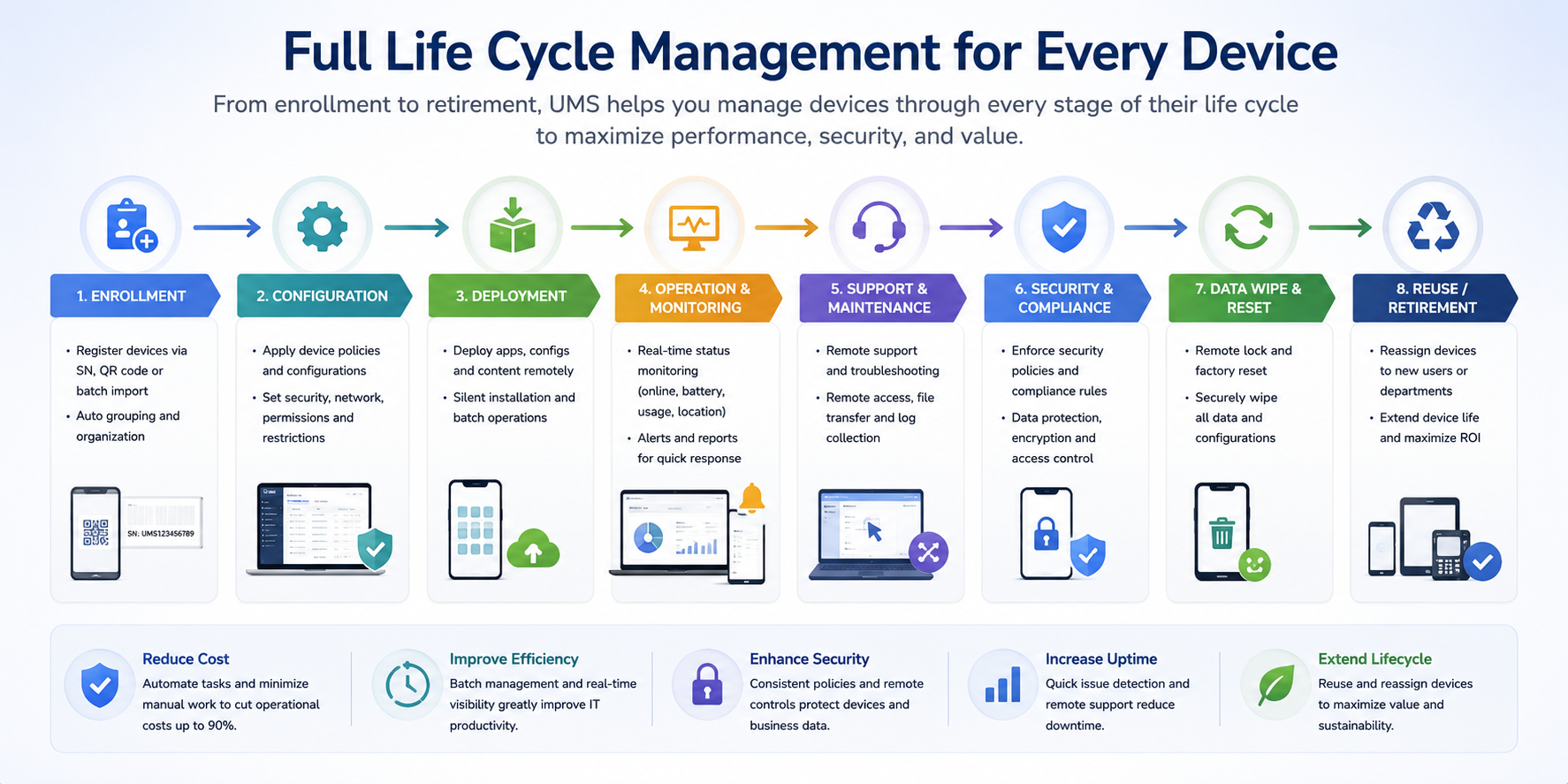
UMS Device Full Life-Cycle Management
FULL LIFE-CYCLE
02 / 14

Full Life-Cycle
Device Management

UMS centralizes registration, configuration, deployment, monitoring, compliance, wipe, and reuse. One platform lowers O&M cost and keeps every device under control.
Devices
4M+

4M+ devices managed

Stages
8

Registration to decommissioning

Cost Reduction
90%

Lower labor and time costs

Security
7×24

24/7 policy enforcement

DEPLOYMENT
03 / 14
FLEXIBLE DEPLOYMENT

Two deployment options

01 CLOUD
Public Cloud
Connect devices without building servers. UMS cloud provides secure access over mobile networks or Wi-Fi, with the same core management capabilities.
  • No server maintenance; upgrades and disaster recovery included
  • 3G / 4G / 5G / Wi-Fi access
  • Ready to use, fast to roll out
  • Scales for large device fleets
02 PRIVATE
Private Deployment
Deploy UMS inside the enterprise intranet. Data stays under customer control for strict security and compliance needs.
  • Data stays inside the enterprise intranet
  • Supports strict compliance and confidentiality requirements
  • Full control over server resources
  • Supports OTA firmware upgrades (UTMS)
WHY MDM
04 / 14
PAIN POINTS · Four Major Challenges

Pain Points in Device Management

01 · Device Control
Scattered devices
decentralized management
Devices are spread across sites, making status invisible and configurations inconsistent.
→ Remote centralized management · Batch group operations
02 · App Governance
Chaotic app distribution
uncontrolled version management
Self-installed apps and version drift make business software hard to control.
→ Enterprise app store · Silent installation · Blacklist & whitelist
03 · Data Security
Data breaches
& device loss risks
Lost devices, unsafe networks, USB copying, and unauthorized apps increase leakage risk.
→ Remote wipe · Geofencing · Permission lockdown
04 · O&M Efficiency
High O&M costs
slow incident response
On-site troubleshooting is slow and costly; issues are often found too late.
→ Remote desktop · Real-time monitoring · One-click diagnostics
UMS Solution
SOLUTION
05 / 14

Solution

UMS
Unified Management System
All-in-one device management system
CORE CAPABILITIES
01 Application Management
02 Device Control
03 Content Distribution
04 Remote Desktop
05 Security Policies
06 Geofencing
07 System Customization
08 Kiosk Mode
09 Data Wipe
10 Full Life-Cycle Management
SECTION 01 · Application Management
1

Application Management

1.1 App Market

Centralize enterprise apps, then deploy by group in bulk. Every device stays on the approved app version.
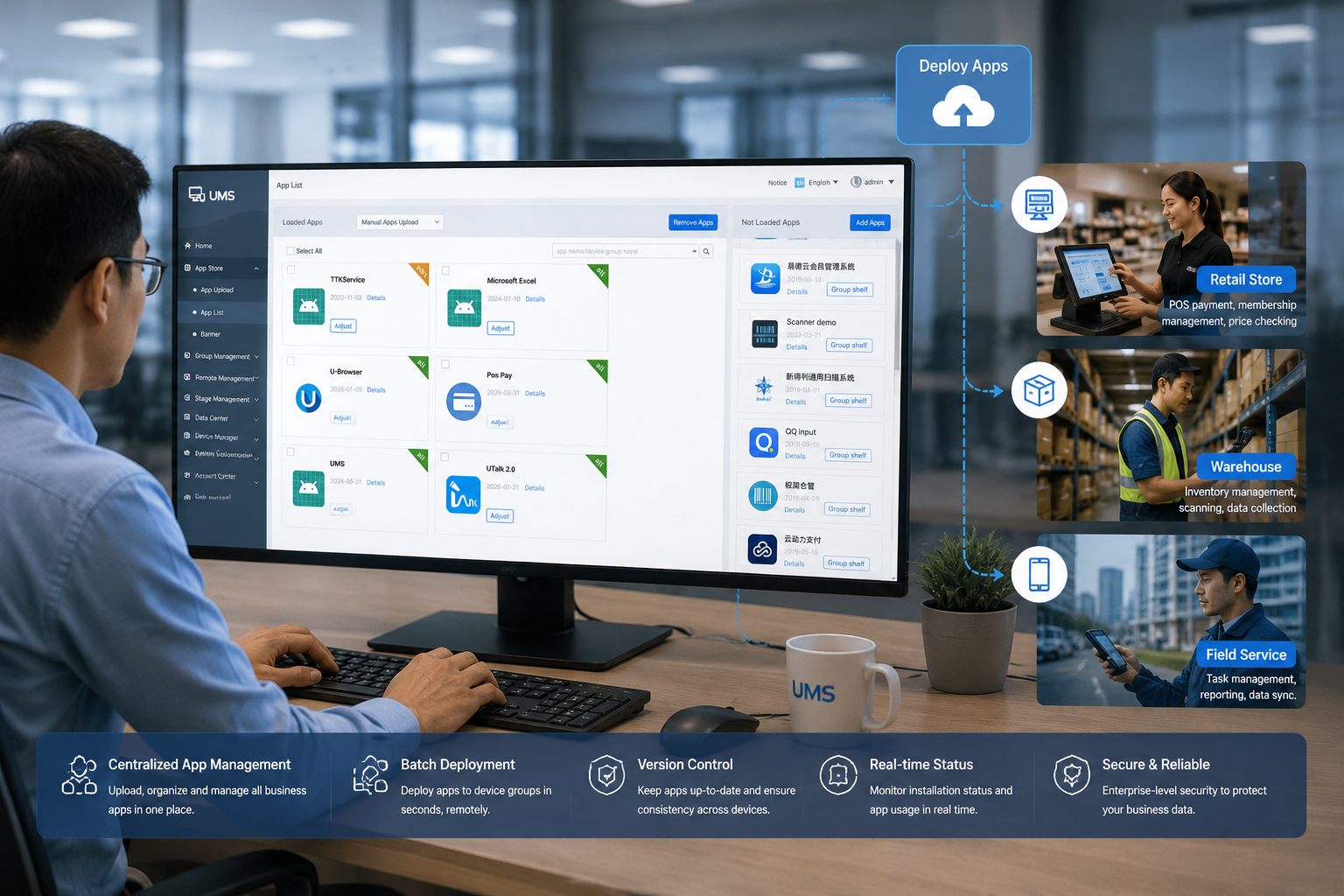
Unified Storage
Enterprise app catalog
Batch Deployment
One-click group rollout
Version Control
Upgrade and rollback
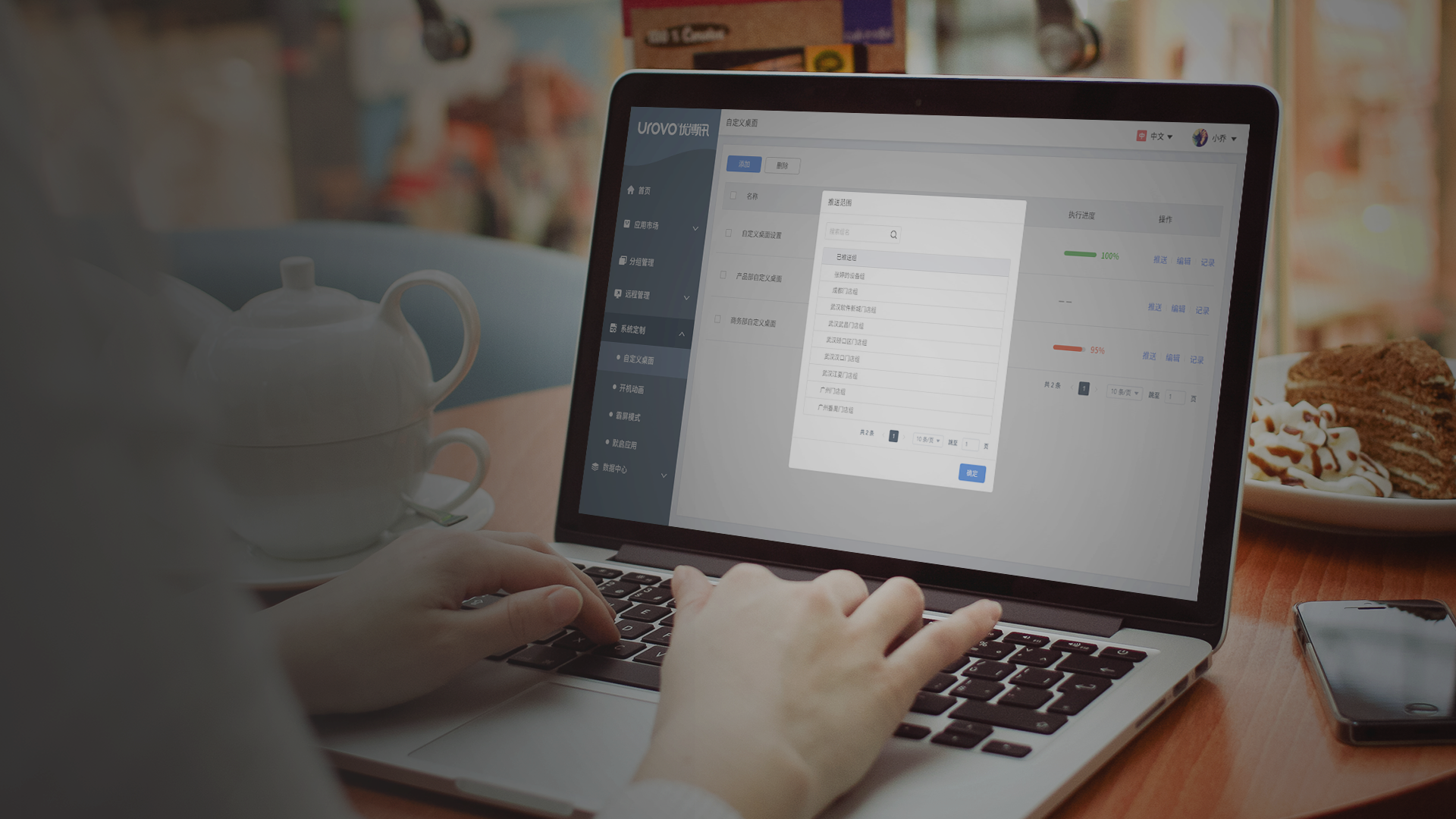
UMS Enterprise App Market
SECTION 01 · Application Management
07 / 14
1.2 Management Features

Application Management

01 · App Deployment

Silent Installation & Batch Deployment

Push apps remotely by group or SN. Devices install silently and stay on the approved version.

Silent Install Group Batch Version Unify
02 · App Whitelist & Blacklist

App Blacklist & Whitelist

Allow only approved apps or block risky ones. Keep devices clean and compliant.

Whitelist Blacklist Block Compliance
03 · Device Lock

Kiosk Mode

Lock devices to one app or a controlled app set. Built for POS, kiosks, scanners, and dedicated terminals.

Single App Lock Multi-App Mode Anti-Exit
04 · App Info & Audit

App Information Management

View installed apps, versions, status, and history. Search by SN and export for audit.

Global View Version Tracking Excel Export
SECTION 02 · Remote Management
2

Remote Management

2.1 Status Monitoring

Monitor online status, battery, network, storage, and GPS in real time. Anomalies trigger alerts before operations are interrupted.
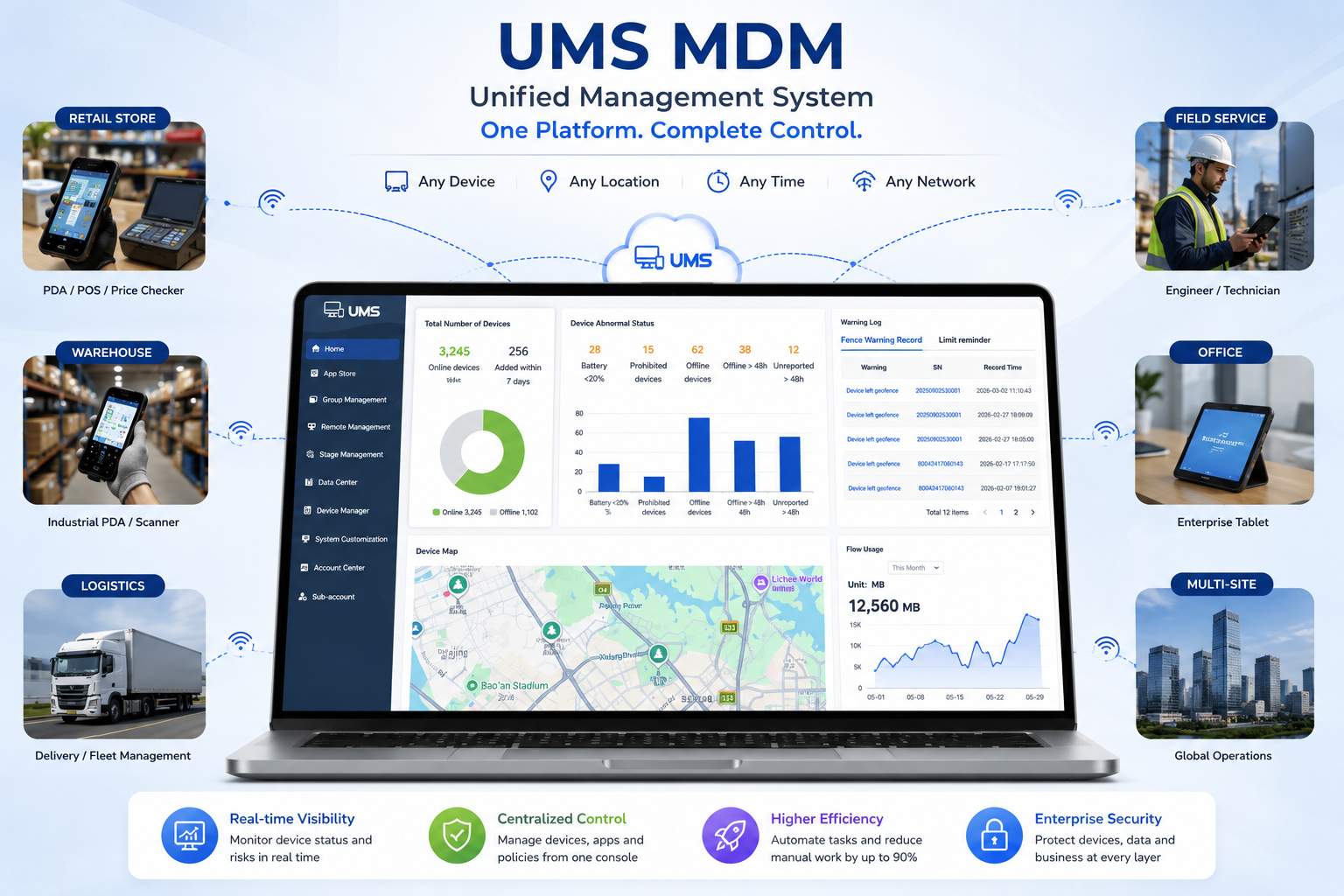
Real-time Monitoring
Full device status overview
Device Map
GPS global positioning view
Proactive Alerts
Instant anomaly notification
UMS Remote Management - Status Monitoring
SECTION 02 · Remote Management
09 / 14
2.2 Remote Functions

Remote Management

01 · Status Monitoring

Real-time device status visibility

View status, battery, network, storage, and firmware in one place. Spot anomalies instantly.

MQTT Real-time Data Monitor Alert Log
02 · Remote Control

Device control without on-site visits

Reboot, lock, wipe, ring, and extract logs remotely. Batch actions cut site visits.

Batch Ops Log Extraction Remote Desktop
03 · Config Push

One-click batch policy deployment

Push Wi-Fi/APN settings, Android permissions, Wi-Fi whitelist, and polling rules remotely.

Permission Ctrl WiFi/APN Deploy Rules
04 · System Customization

Device system-level customization

Customize boot animation, Launcher, auto-start, Kiosk, and app rules. Turn devices into dedicated terminals.

Boot Anim Launcher Kiosk
SECTION 02 · Remote Management
10 / 14
2.3 Geofencing

Geofencing

Set virtual fences for devices. When a terminal leaves the area, UMS triggers actions and alerts to protect assets and compliance.
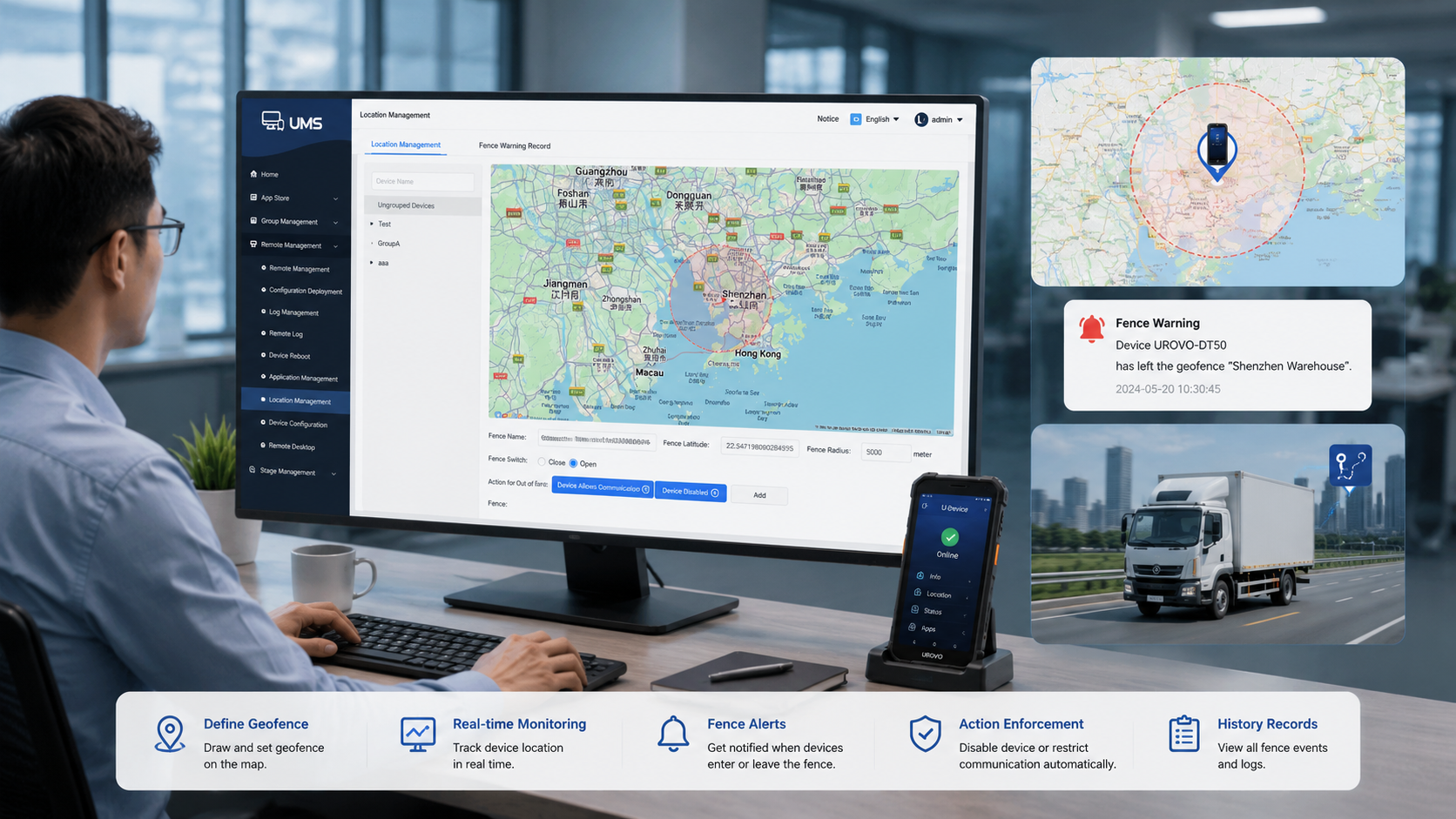
Action 1
Disable Network
Block data exfiltration
Action 2
Freeze Device
Lockdown to prevent use
Action 3
Ring Alarm
Instant locate and find
Fence Radius Min 50m
Alerts Email + records
Positioning Real-time GPS
UMS Geofencing Feature
SECTION 02 · Remote Management
11 / 14
2.4 Remote Desktop

Remote Desktop

With Awesun remote desktop, IT can view screens, operate devices, and diagnose issues in real time. Troubleshooting happens without site visits.
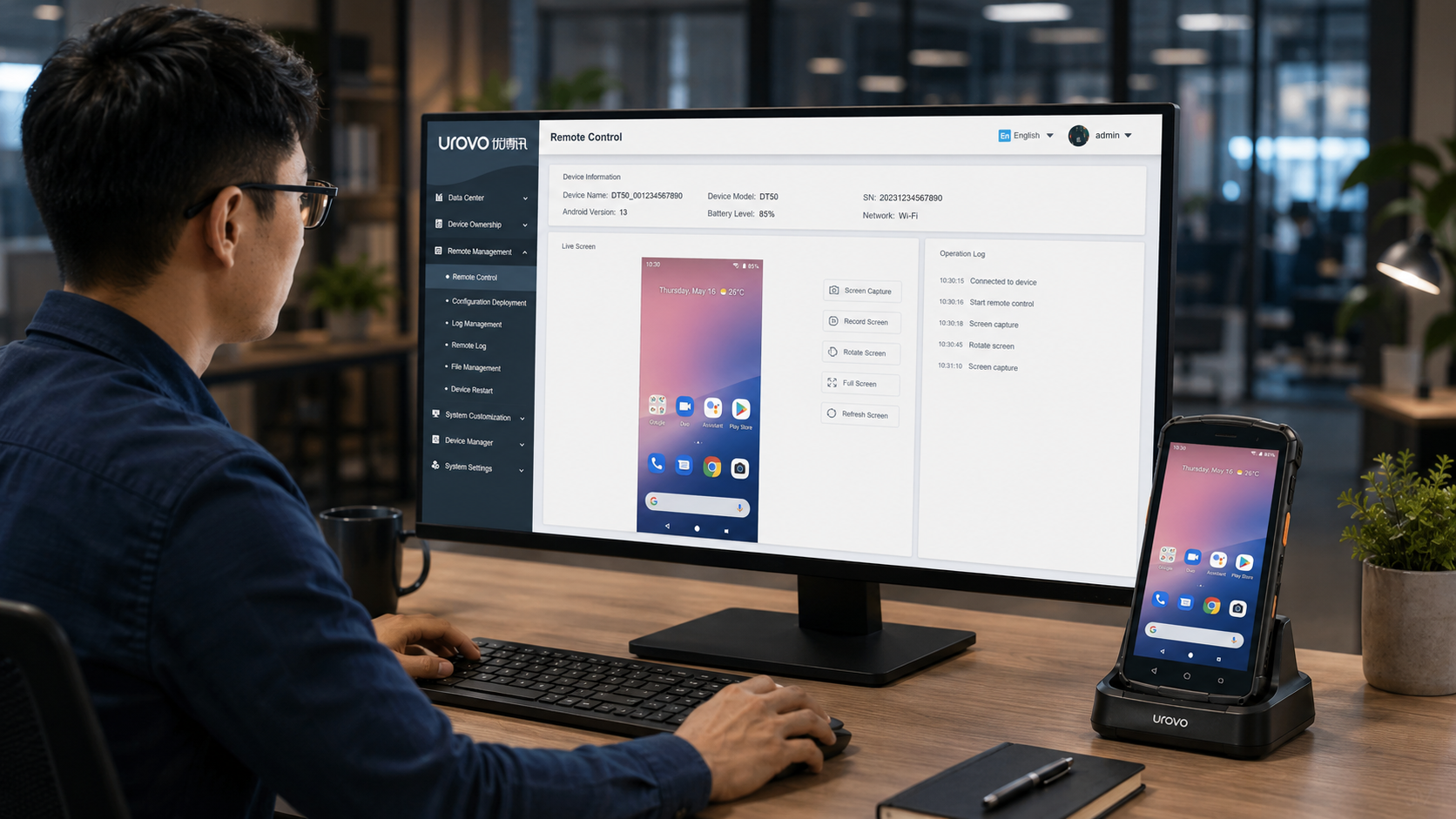
Core 1
Live Screen
Mirror terminal interface
Core 2
Remote Control
Direct terminal operation
Core 3
Remote Diagnosis
Troubleshoot without visits
Engine Awesun
Extensibility Third-party integration
Business Value 90% fewer visits
UMS Remote Desktop Feature
SECTION 02 · Remote Management
12 / 14
2.5 Enterprise Launcher

Enterprise Launcher

Replace the default desktop with a branded enterprise Launcher. Show only approved apps and keep operators in the intended workflow.
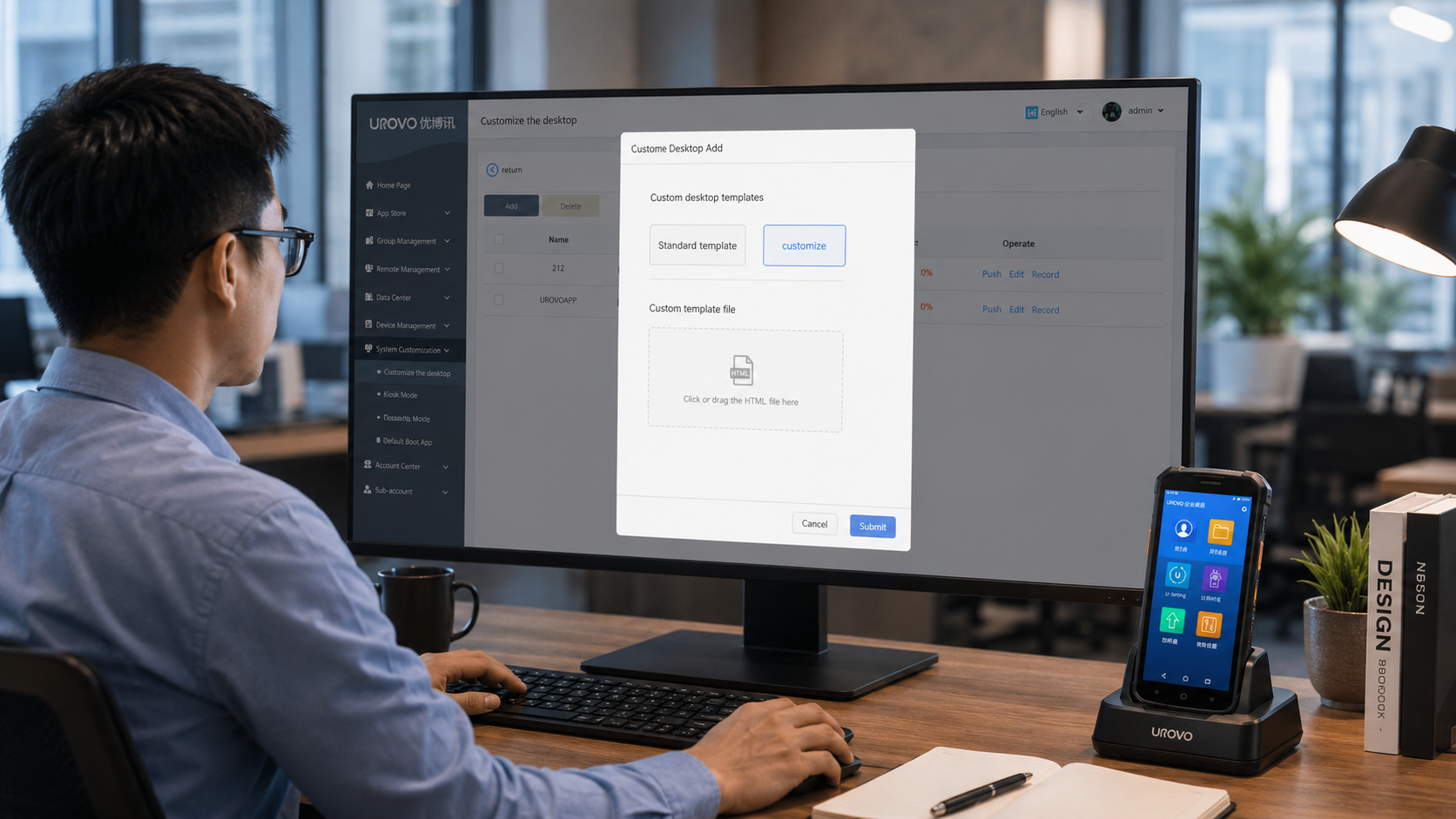
Mode 1
Custom Desktop
Upload APK as desktop
Mode 2
Standard Template
Urovo Enterprise Launcher
Mode 3
Auto-start
Boot directly into work app
Companion Boot animation customization
Use Cases POS / Warehouse / Retail / Kiosk
Security Exit disabled, hide system settings
UMS Enterprise Launcher
SECTION 03 · Account Management
3

Account Management

3.1 Permissions & Sub-accounts

Use role-based accounts for operators, administrators, and sub-accounts. Assign or reclaim devices so each team manages only its own scope.
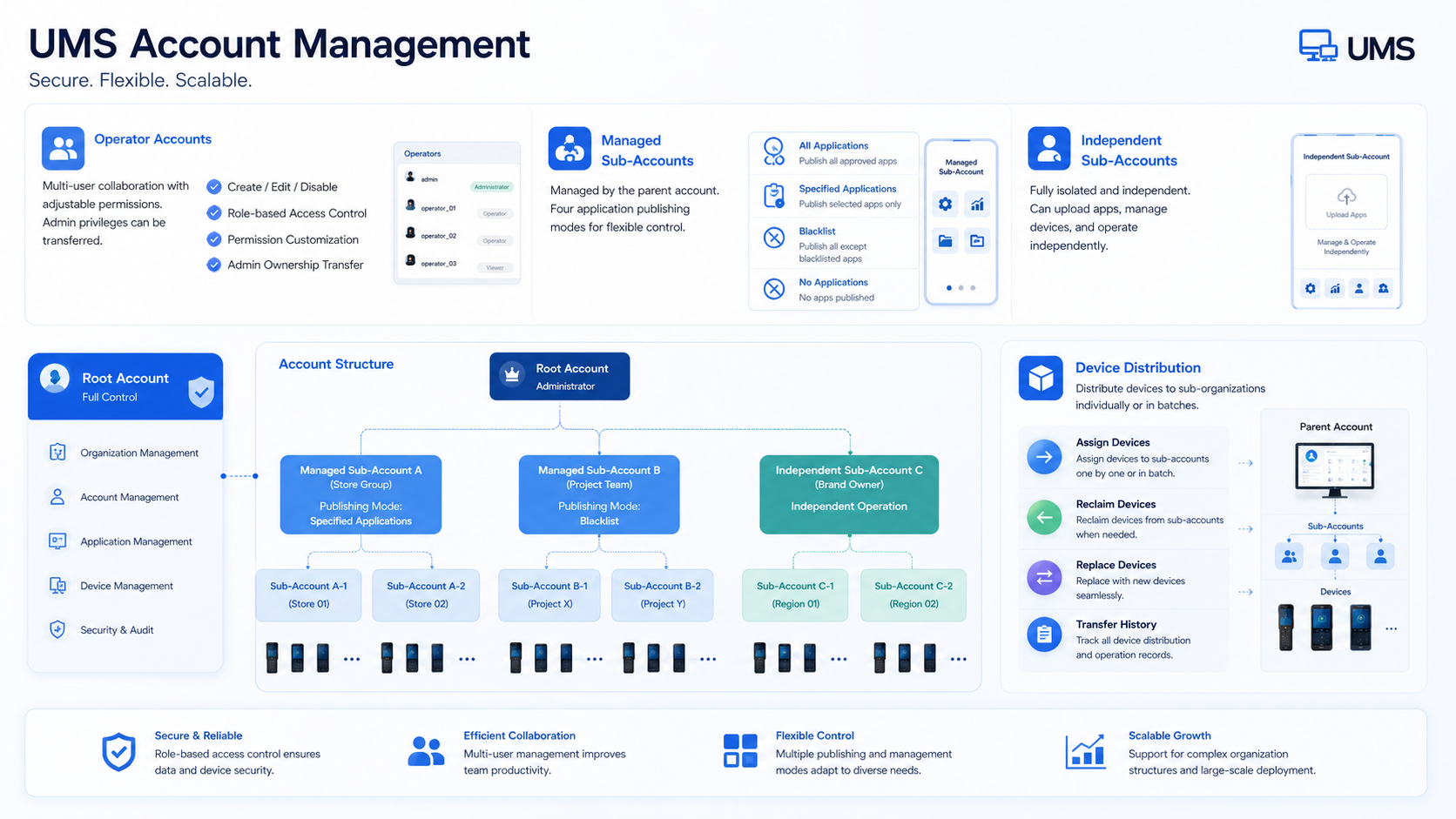
Operator
Multi-role coordination
Sub-account
Controlled / independent modes
Device Assign
Batch distribution & reclaim
UMS Account Management
14 / 14
UROVO · Unified Management System
THANK YOU

Build, secure,
and scale
device fleets.

UMS brings app management, remote operations, security policies, geofencing, and account control into one enterprise platform.
Scale
4M+
Efficiency
90%
UROVO · Device Management
All-in-one enterprise control